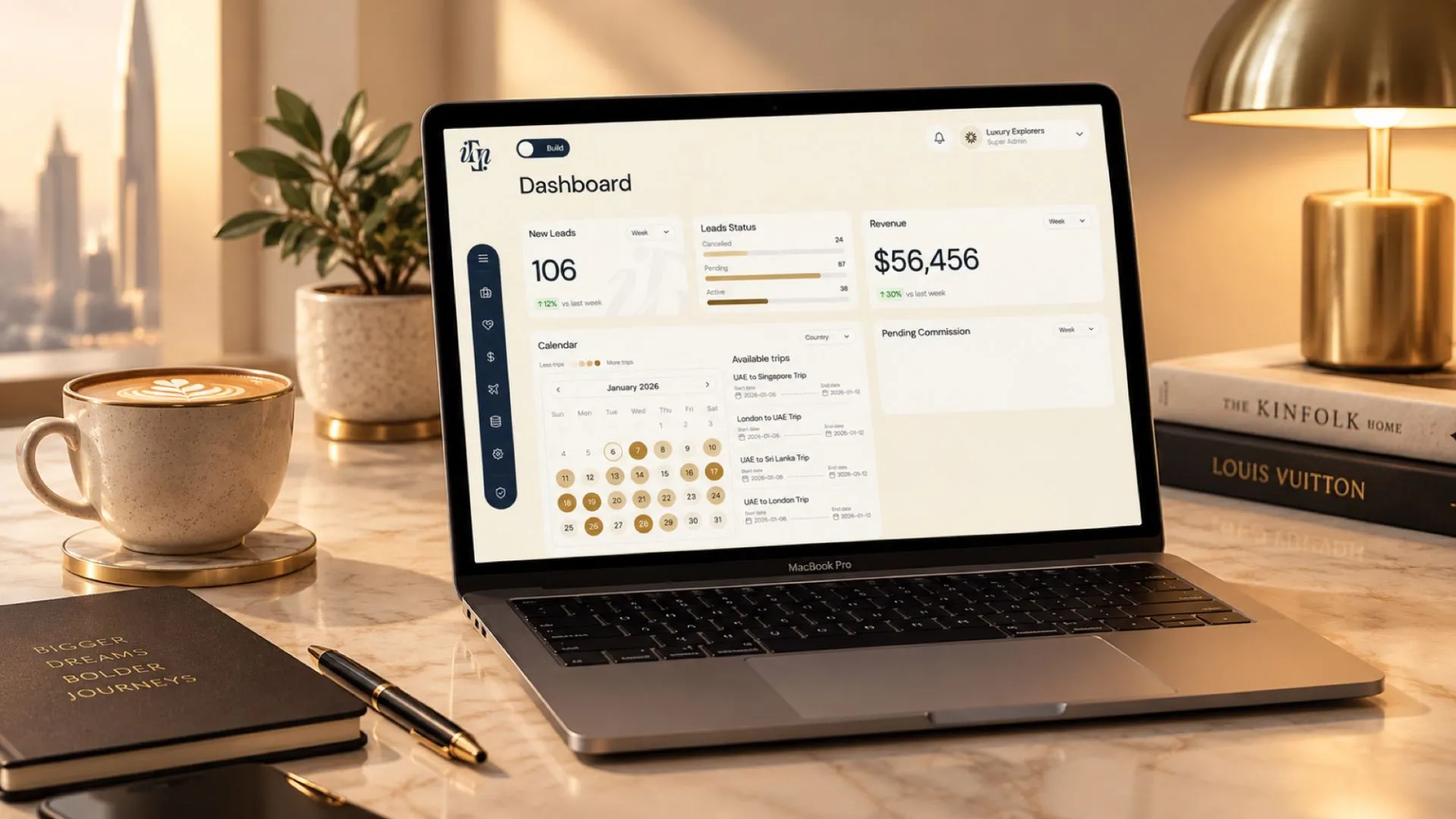
iTravellé — the operating system for luxury travel businesses.
Independent travel advisors run an entire agency from one place: inventory, AI proposals, bookings, finance, partner operations. I led product design end to end — strategy, research, architecture, design system, every core screen, developer handoff and the brand film.
The problem
Operators live in this product all day, and it overloaded them: one dense table doing every job, long pages that had to be scrolled end to end, journeys that broke between steps, and no sense of where you were in any multi-step process.
What I did
Ran real tasks through the live product and logged every point of friction, then fixed them: four views over the same data, an interactive map into Lexis, in-page tabs, browser-style lead tabs, progress on every flow, and guided booking and finance journeys.
The outcome
Nine headline UX optimisations across four surfaces, plus a shipped public platform and a fully specified partner ecosystem: 42 artboards, 16 modules, a WCAG 2.1 AA design system, and every screen state defined before build.
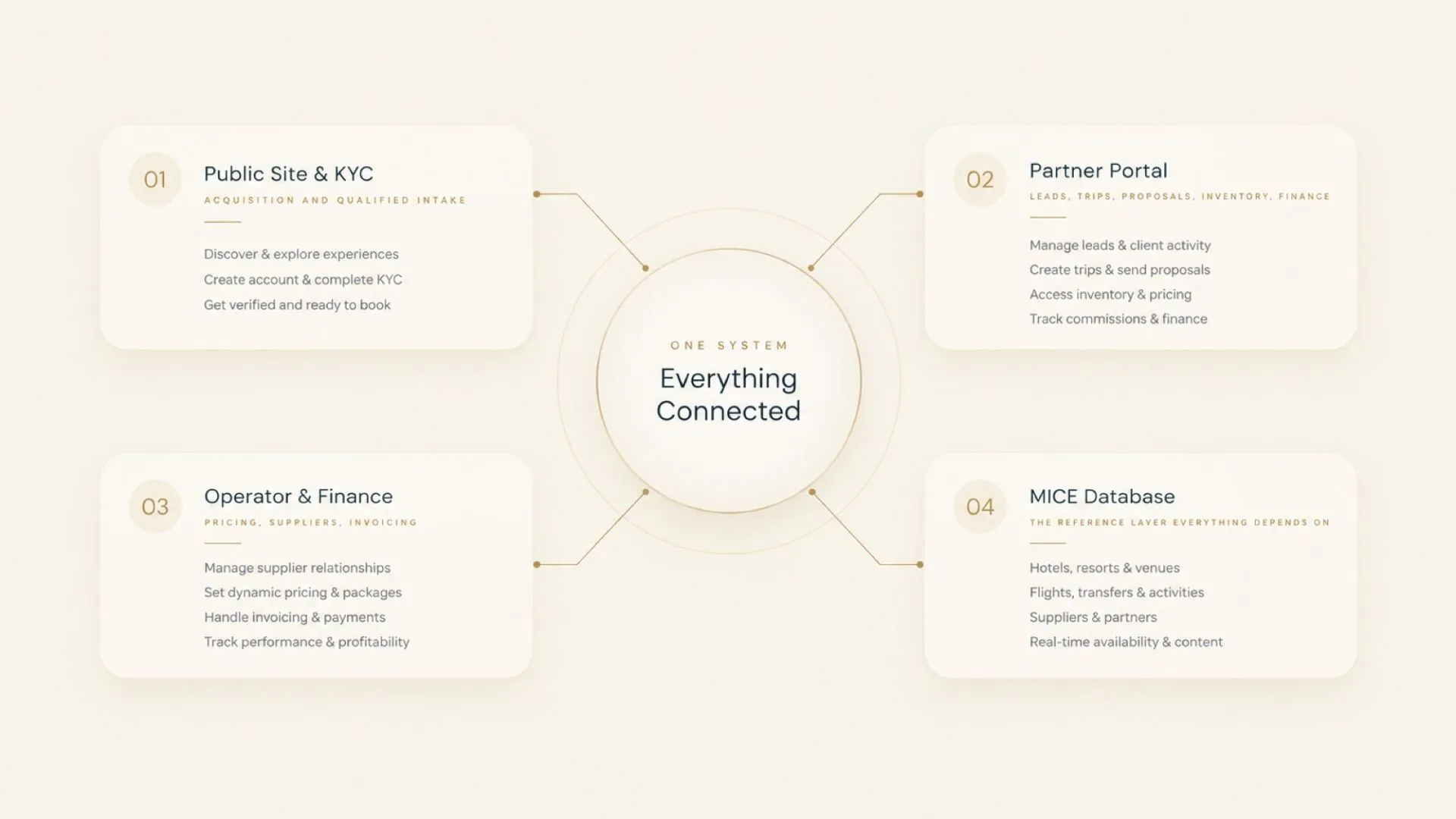
Four surfaces, one product
An advisor selling a two-week itinerary was pricing across three currencies by hand, chasing suppliers by email, building proposals in a document and reconciling commission weeks later. iTravellé collapses that into one workflow — and its own claim is blunt: reduce more than 90% of travel management effort.
- Public site & KYC — acquisition and qualified intake
- Partner Portal — leads, trips, proposals, inventory, finance
- Operator & Finance — pricing, suppliers, invoicing
- Lexis — the MICE master database everything else depends on
Nine problems I solved
Travel operators live in this product all day. Almost every problem worth solving came down to the same thing: too much information, too little orientation, and journeys that broke halfway through. These are the nine that moved the needle most — there were many more.
Four views over the same data
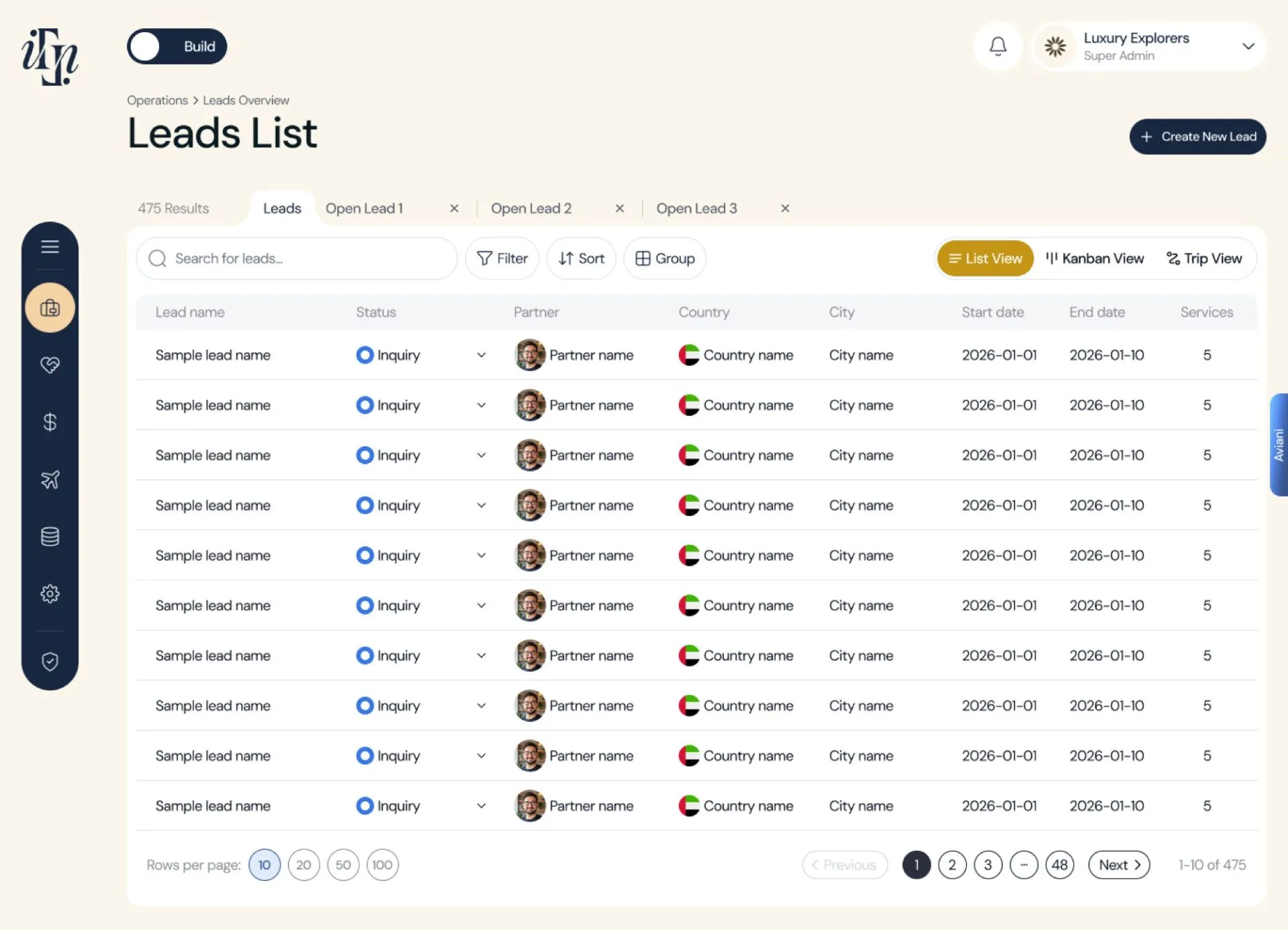
Problem. One dense table was being asked to do every job at once — scanning status, tracking a single trip, comparing records side by side. Everything looked equally important, so nothing did.
What I did. Table, Kanban, Trip and List views over the same records. Table to compare, Kanban to see status move, Trip view to follow one journey end to end, List to scan quickly. The user picks the shape that fits the task instead of reading around the three that don't.
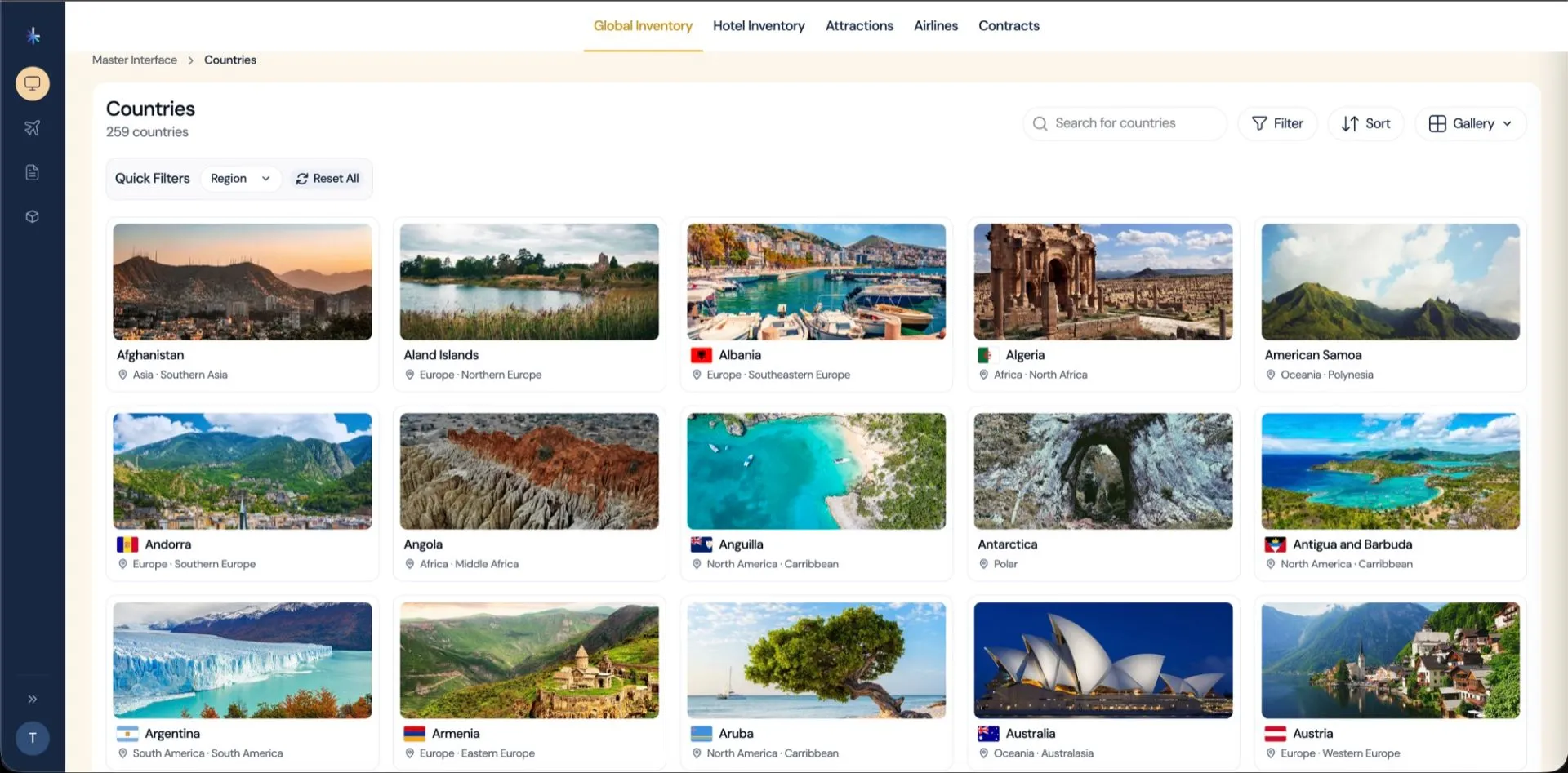
An interactive map instead of an endless list
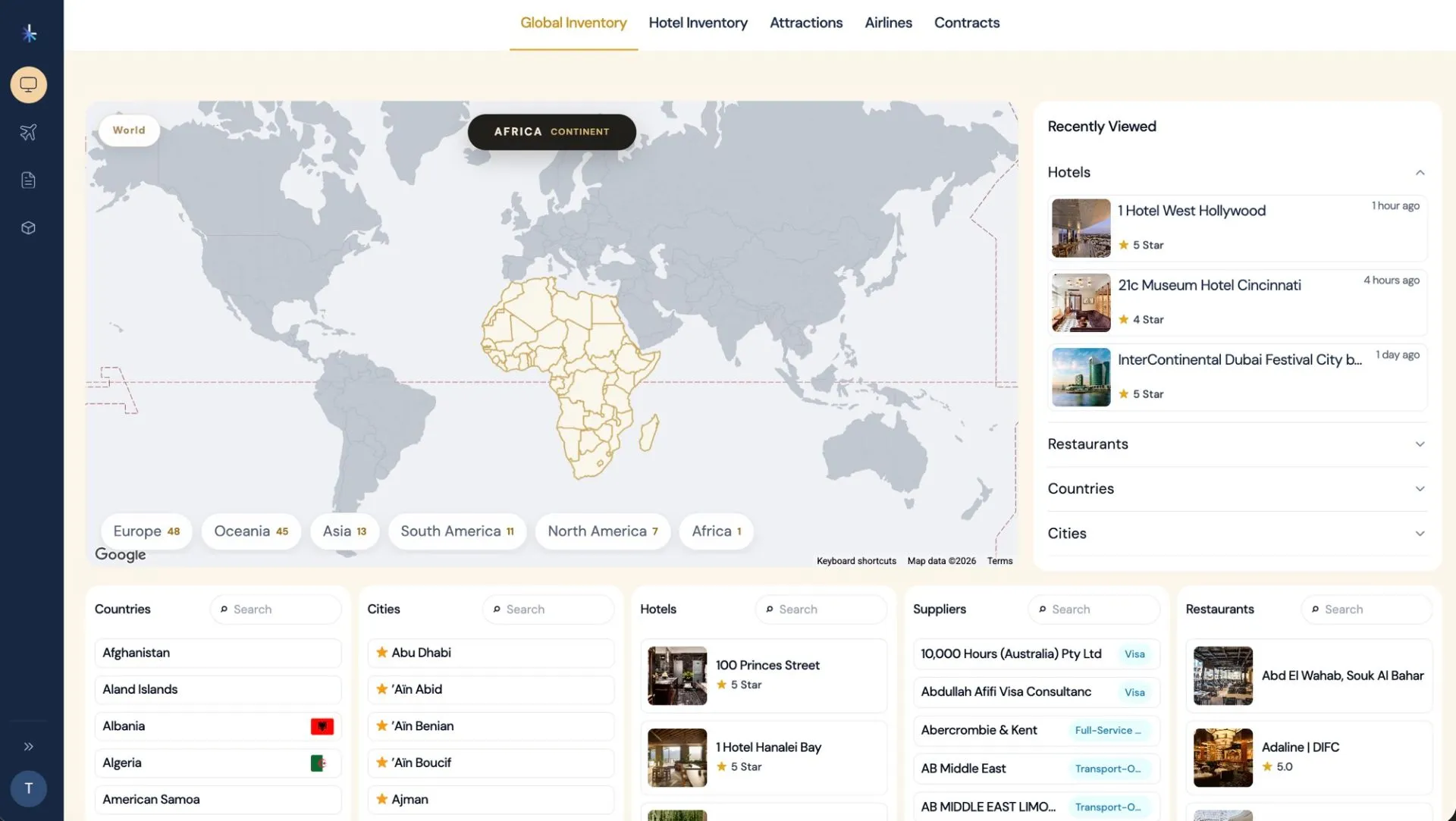
Problem. In Lexis, the MICE master database, finding a hotel, restaurant, attraction or airport in a particular place meant scrolling thousands of rows and filtering blind. The question was spatial; the interface was a list.
What I did. Made the map the entry point. Click a location and get exactly what's there, filtered by category. A spatial question now gets a spatial answer — no scrolling through bulk lists to reach one city.
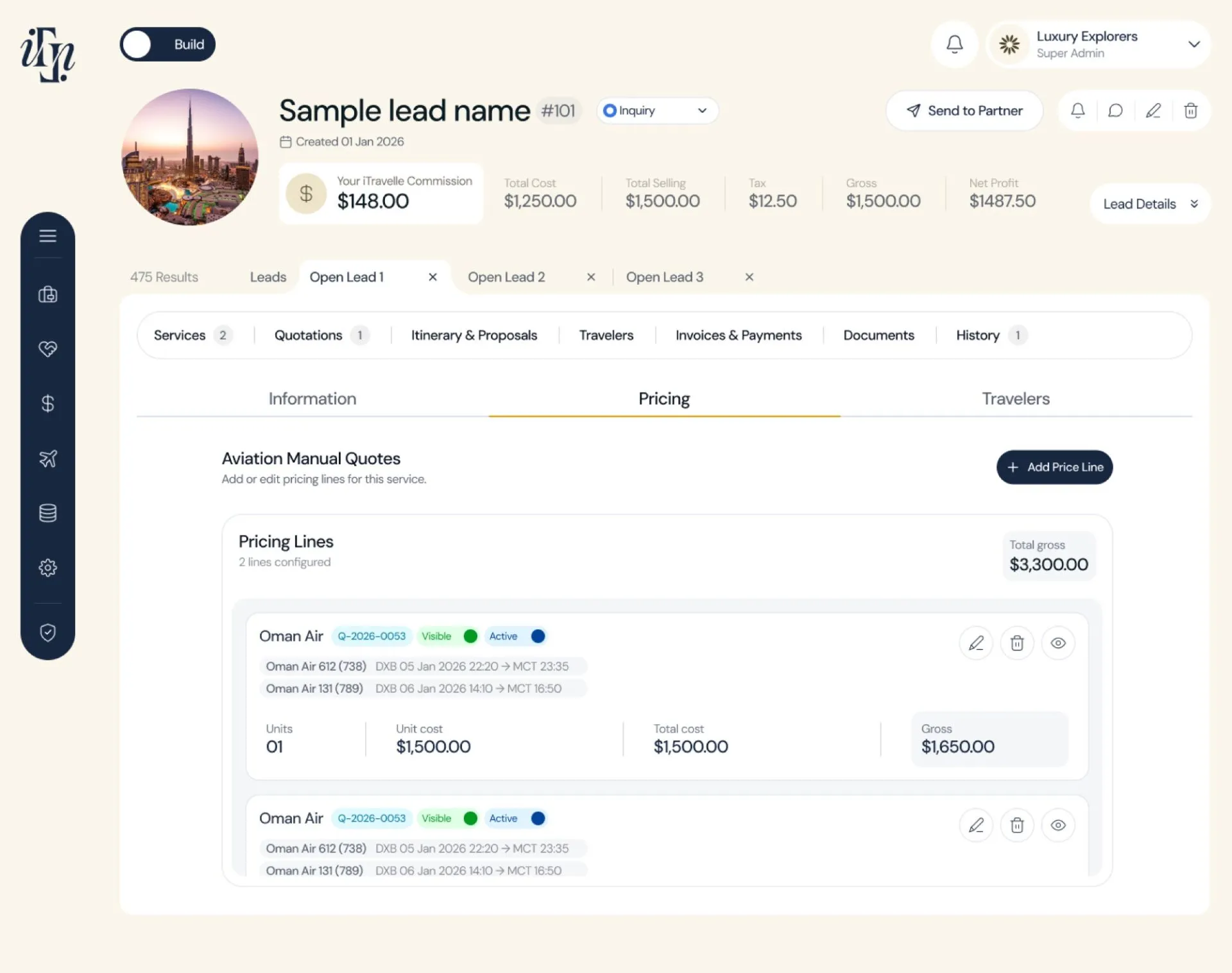
Horizontal tabs inside the page
Problem. Record and detail pages ran long. Users scrolled continuously, lost their place, and had no way of knowing how much was still below them.
What I did. Sectioned every long page behind horizontal tabs. Nothing sits below a scroll, everything is one click away, and the tab row itself tells you what the page contains before you open anything. The page you're reading uses the same pattern.
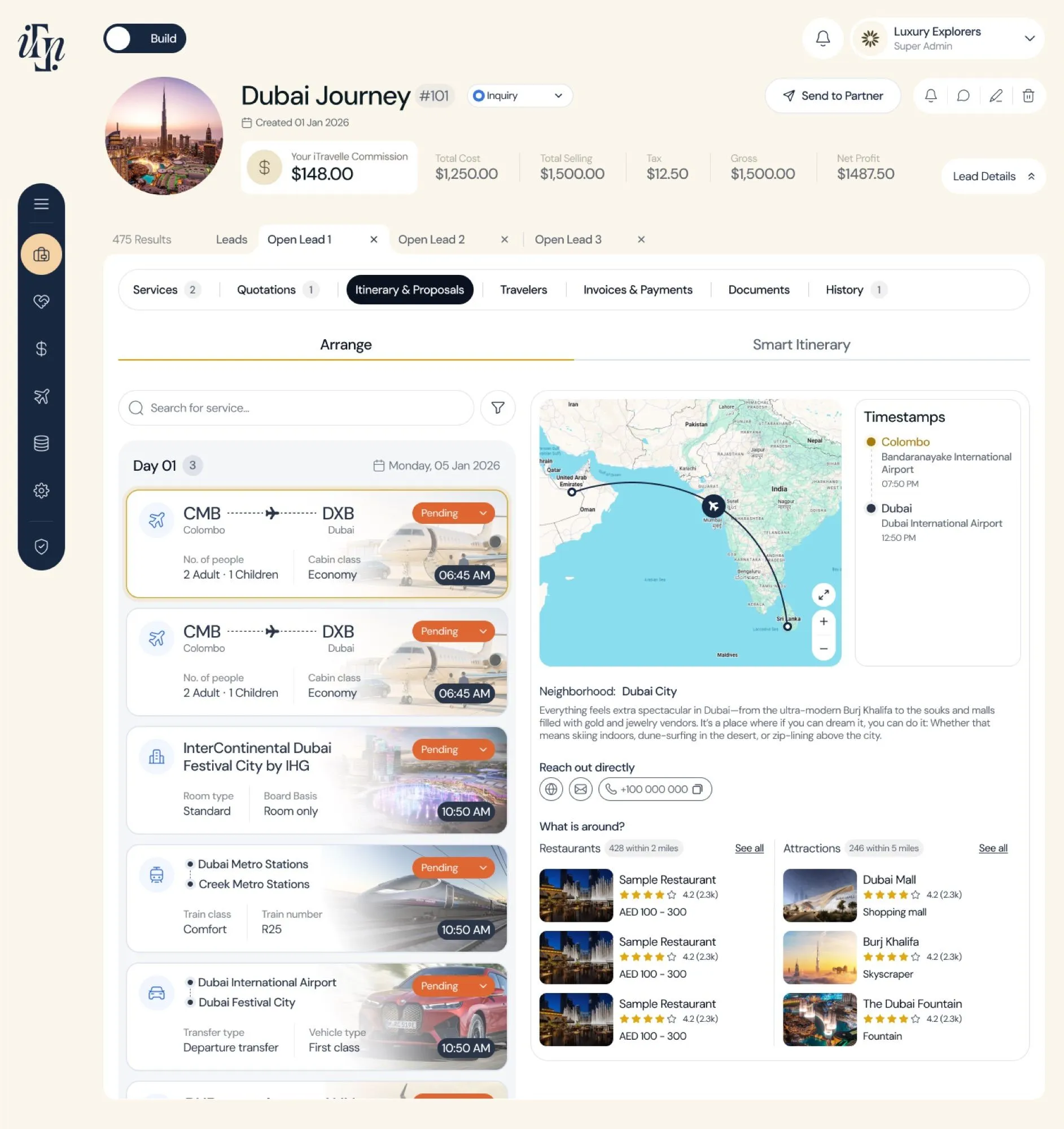
Leads as browser-style tabs
Problem. Partner ops work several leads at once, but the portal made you navigate away and back for every switch — losing your place, and sometimes your work, each time.
What I did. Open leads sit in a Chrome-style tab strip across the top. Several stay live at once and switching costs one click instead of a round trip through the list. It borrows a pattern every user already knows, so it needed no explaining.
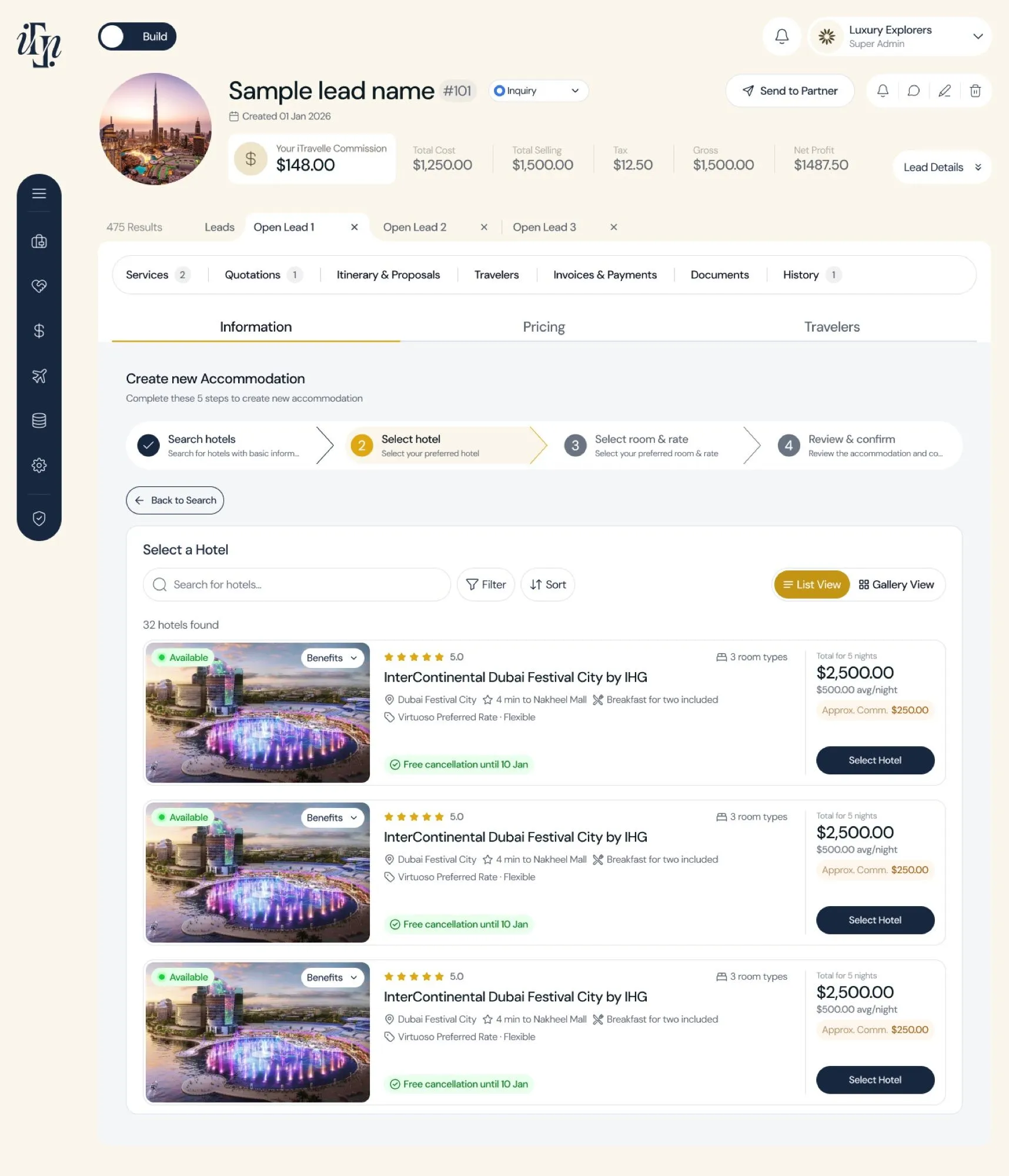
Back and smart navigation everywhere it's needed
Problem. Dead ends. Users reached deep screens with no way back except the browser button, which frequently threw away what they'd entered.
What I did. Explicit back controls and contextual navigation on every screen that needs one — each returning to the exact place, and the exact state, the user left. Breadcrumbs on deep records, previous/next between sibling records, and a persistent way out of every flow.
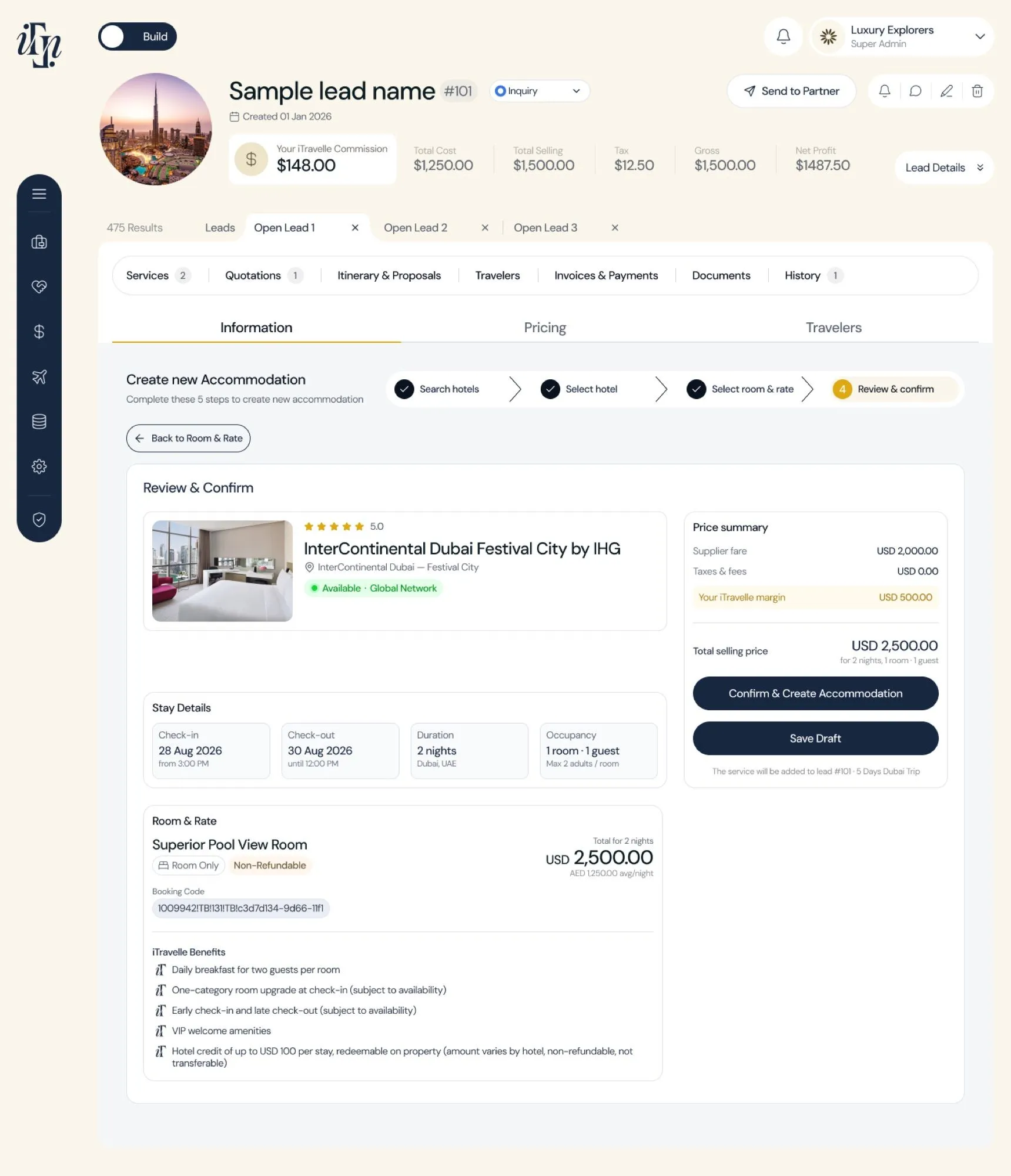
Progress indicators on every multi-step flow
Problem. Multi-step processes gave no sense of position. Not knowing how many steps were left is one of the most reliable causes of abandonment there is.
What I did. A progress indicator on every multi-step flow, naming the current step and how many remain. Knowing you're on step three of five turns an open-ended task into a countable one — and people finish countable tasks.
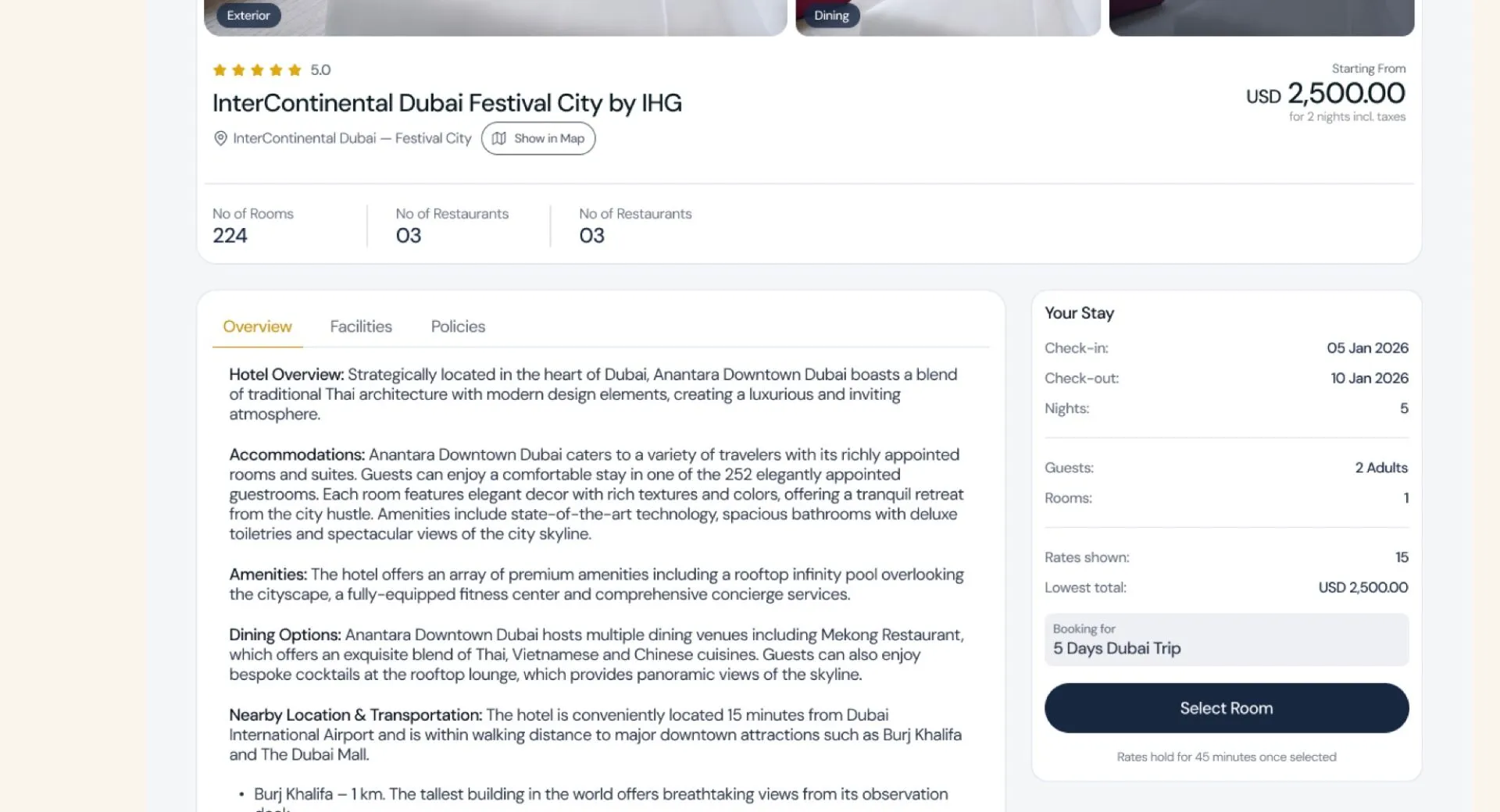
Hotel and restaurant booking, guided end to end
Problem. The booking journey broke between steps. Users lost the thread and had to reconstruct where they were and what they'd already chosen before they could continue.
What I did. A guided flow that carries context forward. Every step shows what's been selected so far, what this step needs, and what comes next — right through to confirmation. The journey is never dropped between screens.
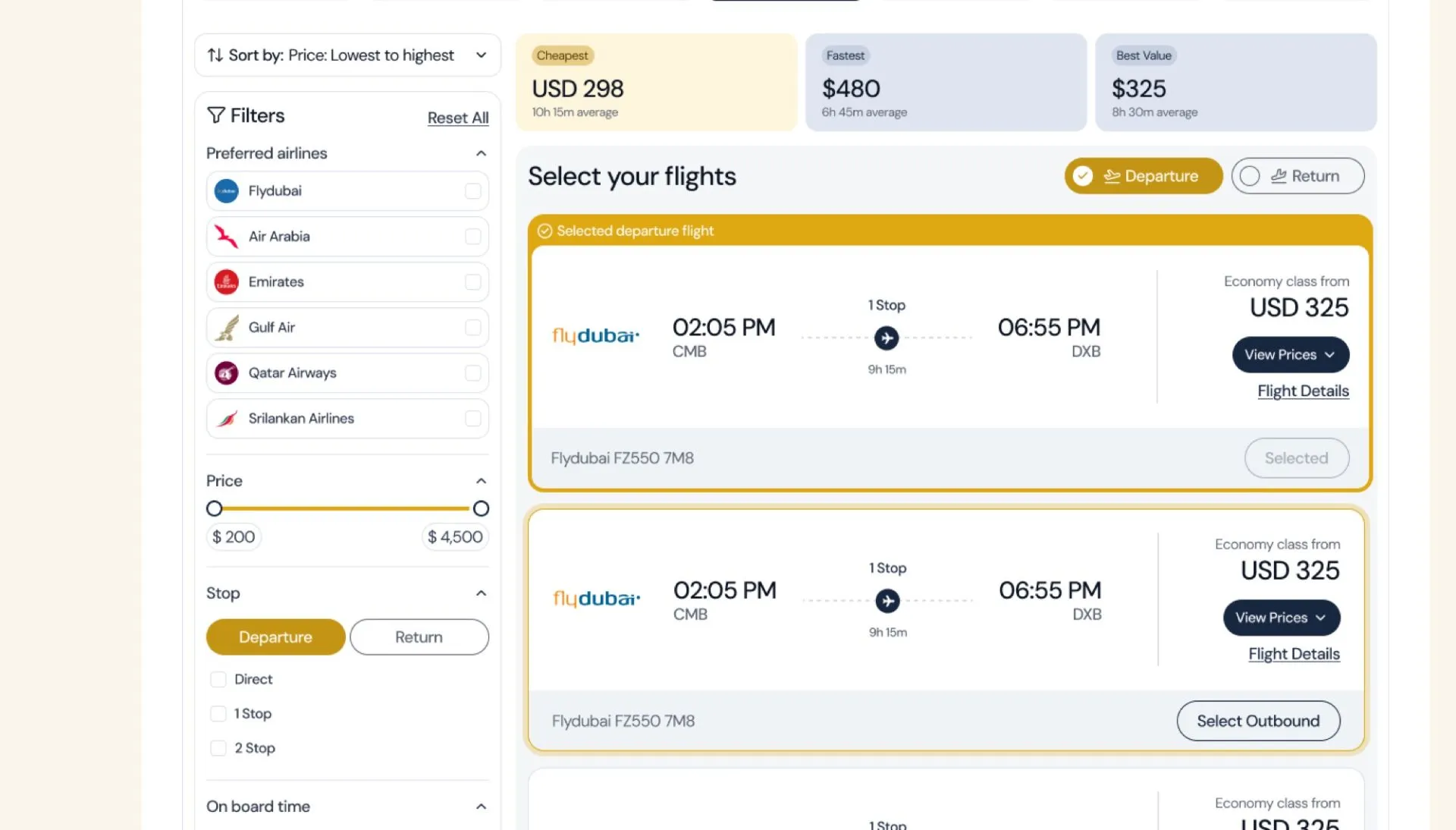
Flight booking with a real review step
Problem. Flight selection is the highest-stakes and least reversible action in the product, and it was possible to confirm without a clear final check of what you'd chosen.
What I did. An explicitly guided sequence that names the next step at every point, ending in a full review-before-confirm screen with every selection editable in place. Mistakes get caught while they're still cheap.
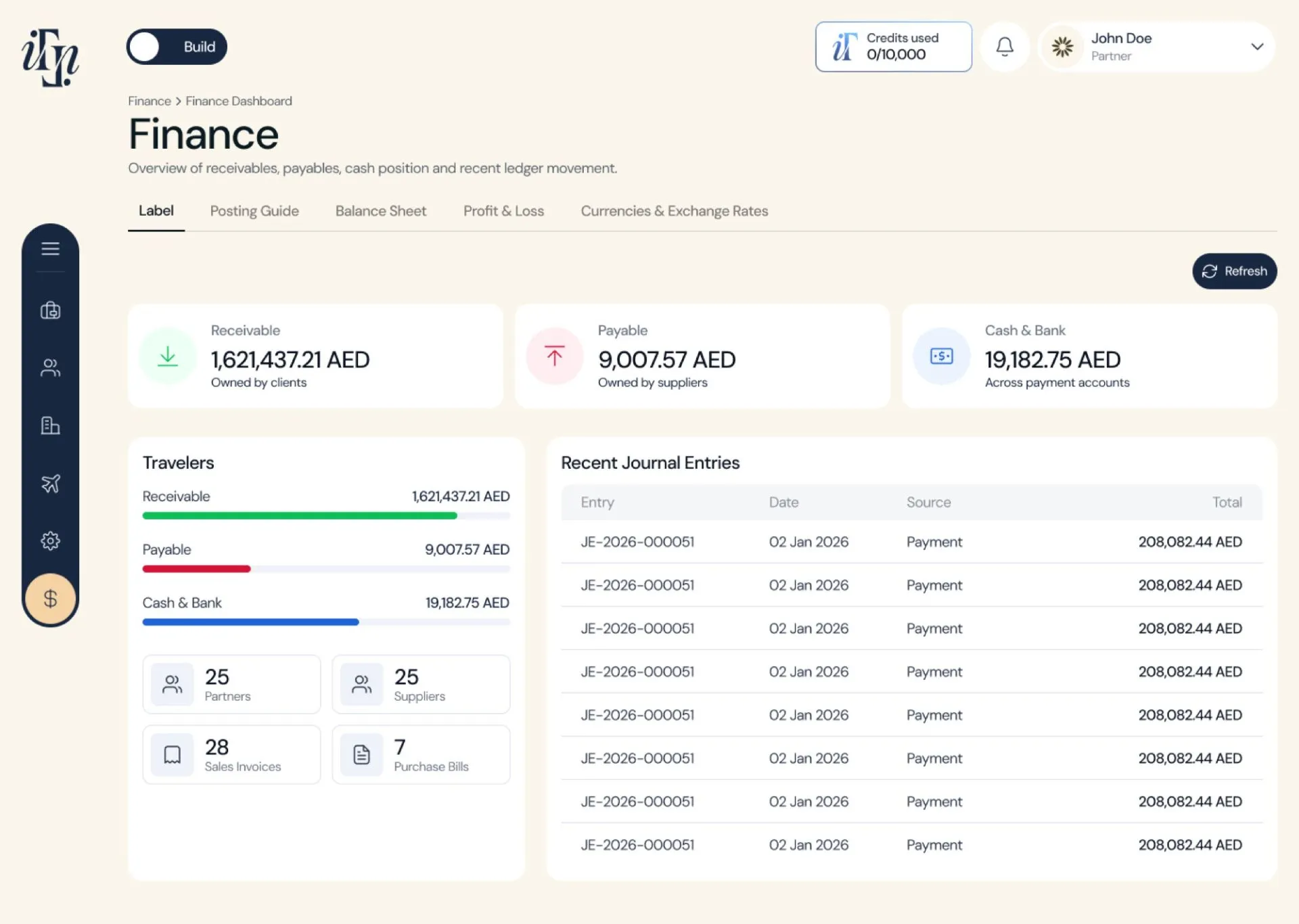
Quotations and invoices that can actually be amended
Problem. Price changes are constant in travel. Amending a quotation meant rebuilding it, and margin, markup and commission were being worked out in spreadsheets outside the system.
What I did. Editable quotations and invoices with saved drafts, plus profit, margin, markup and commission calculated in-product and recalculated on every amendment. A client asking for a change became an edit, not a rebuild.
And the ones not shown here
These nine are the headline optimisations. Alongside them: consistent loading, empty and error states across every module; structured field types replacing free-text entry; commercial data gated by role; inline entry flows that return you where you were; and a single navigation and badge system applied across all sixteen modules. Those sit under Approach and The work.
How I found them
Not from a brief. I worked through the live product as the operators do — logging in, running real tasks end to end, and writing down every point where I lost my place, lost my work, or couldn't tell what to do next.
That produced a defect log with evidence attached rather than a list of opinions, which is what made the fixes easy to argue for and easy to prioritise.
The underlying data defects — what was breaking beneath the interface
Several of the interface problems above had a cause one layer down. The audit turned up six structural defects in the data layer, all traceable to one thing: storage, access and presentation had collapsed into a single layer, so the raw table was the interface for every user.
recRNIqEFMGg3m9jK instead of a country name.a Destination Reference type that always resolvesALL | Albanian Lek | L.a structured Currency type — code, name, symbolWhat I kept, deliberately: the grouped record-detail pattern that already worked in one module, the field-level revision history already logging who changed what with before/after values, and the domain-relevant filters the team had got right. Naming what to protect is as much of the job as naming what to fix.
Roles and data first, screens second
In a permissioned B2B system, layout is downstream of who is allowed to see what. I drew nothing until that was settled.
Audit & frame
Logged into production, documented defects with evidence, reframed the brief from “make it prettier” to “separate three collapsed layers”.
Map the actors
Nine user types, four journeys, every step mapped to an access level — a live workbook I walked the client through.
Architect
Defined the storage / access / presentation split, the custom field-type library, and the structure all 16 modules share.
Design & specify
Greyscale zones → hi-fi on tokens → all four states per component → a written UX specification.
Hand off & hold
Annotated Figma, specs, and an accessibility checklist that gates approval. Stayed in review through build.
The decision that shaped everything
The obvious move was migrating off the no-code base onto a “proper” platform. I argued against it in writing, and the client agreed.
A migration would have burned the timeline, risked live data across 139 countries and a growing supplier base, and fixed nothing structural — the same flat model would have been rebuilt somewhere more expensive.
Instead: keep the schema, govern who can create and see fields, build task-specific views on top. Cheaper, faster, and it addresses the actual cause.
Nine roles, one wall that can't break
Partners must never see cost, markup or profit. That single rule governs what every screen renders.
I built the role model as a working artefact, not a slide: one tab per actor, every step of their real flow, and an access level per sub-user — Full, View only, No access, Approval needed, Own data only, or explicitly To be confirmed.
Marking cells “TBC” instead of guessing was the highest-value thing in the document. It surfaced six real open questions before they became rework in build.
Six reference products, each studied for one lesson
- NocoDB — spreadsheet feel over a governed relational database. Proof that “same feel, better foundation” is achievable.
- Baserow — deeper native field types than a generic grid. The case for a domain-specific field library.
- Teable — the closest philosophical sibling; patterns for structured sub-fields.
- Retool — the access layer specifically: query-level filtering plus component-level role gating.
- Stacker — turning a spreadsheet base into a role-gated portal without a platform rebuild.
- Pencil & Paper, Data Table UX Patterns — column layout, row actions, density and overflow.
Aesthetic references — where the visual position came from
A system with reasons, not preferences
I wrote the type specification as a standalone document. Every size has a rationale, every rule maps to a WCAG criterion, and the client can hand it to any future developer without me in the room.
Two scales, one family
The landing page uses a 1.250 major third with an 18px body — easier for an advisor audience skewing over 45. The KYC form uses a calmer 1.200 with a hard 16px floor on inputs, which also stops iOS Safari auto-zooming on focus.
Tokens, not values
Colour, spacing, radius and type all live as named tokens. A designer changing a hex in one place is a system; a designer changing it in forty is a liability.
Accessibility as a gate
The WCAG checklist isn't an appendix — handoff isn't approved until it passes. Criterion by criterion, with the specific trap named for each.
The work
Four surfaces, one system. Pick any of them.
The first screen an agency sees after login, every day. The brief I set: orient the user in under five seconds and let them decide what to do next without navigating anywhere. Six vertical zones on a 12-column grid inside a persistent shell.
| Zone | Section | Span | Job it does |
|---|---|---|---|
| Z1 | Header & greeting | 12 | Orientation, period context, partner tier |
| Z2 | Alerts | 12 | Time-sensitive actions above the fold — hidden entirely when there are none |
| Z3 | KPI cards | 3 × 4 | Bookings, active clients, MTD revenue, pending commission — each with a delta |
| Z4 | Revenue + commission | 8 + 4 | Six-month trend, and the next payout — the most motivating number on the page |
| Z5 | Recent bookings | 12 | Last 10; row click opens a drawer, never a page change |
| Z6 | Quick actions | 12 | Five shortcuts, shown or hidden by role — no greyed-out dead ends |
Lexis, the MICE master database — the biggest workstream: 42 artboards across four departments. The visual brief was blunt — the old system's worst flaw was that different modules looked like different products. Everything here shares one navigation, one badge system, one record pattern.
Six custom field types, not generic inputs
Generic field types caused the concatenated currency and the broken lookup. Each replacement has its own control, validation and display — plus a governance rule that only a data steward can create new types, which is what stops the sprawl returning.
| Field type | Behaviour | Defect it retires |
|---|---|---|
| Destination Reference | Structured Continent → Region → Country → City; always resolves to a readable value. | Raw record IDs surfacing to operators |
| Currency | Three independent sub-fields: code, name, symbol. | ALL | Albanian Lek | L as one string |
| Contract Status | Lifecycle state — Draft, Active, Expiring, Expired. | Contracts expiring unnoticed |
| Validity Window | Paired dates with expiry proximity — “Expires in 12 days”. | Stale rates used in live pricing |
| Supplier Type | Governed category list seeded from tags already in use. | Ad-hoc categorisation |
| Document Attachment | Typed by purpose — visa, insurance, company profile. | Untyped file dumps |
The audience is an experienced professional deciding whether to bet their business on a platform. Establish credibility fast, answer the obstacles they already know they have, and make committing feel like a beginning rather than a purchase. One CTA, repeated.
Partner intake is regulated, which usually means a long hostile form. I treated it as the first product experience instead — shrinking legal text is both an accessibility barrier and a compliance risk.
Most handoffs ship one state and let engineering improvise the rest. The improvised ones are exactly where products feel broken — so I specified four for every zone.
Loading
Skeletons per zone, not a page spinner. The shell renders immediately; widgets fill independently.
Empty
A new partner sees “—”, never “0”, plus one clear action. Quiet and single-line, not a toolbar over nothing.
Error
Widgets fail independently: inline message plus retry. One failed call never takes down the dashboard.
Populated
The primary target, with every hover, focus and active state drawn rather than assumed.
The clickable prototype
Built at breadth rather than polish — enough screens across all four departments to prove the pattern generalises, with a live role switcher so stakeholders could feel the permission model instead of taking my word for it.
Product design didn't stop at the interface. I wrote and directed the brand film — a problem-to-resolution arc from the advisor's daily frustration to the product resolving it. The delivered cut runs 43 seconds.
43 seconds. Written and directed by me; produced from my scene-by-scene script and storyboard.

How I structured it
A problem-resolution narrative, not a feature list. The colour grade carries the story: scene two is deliberately cool and desaturated, and it warms into champagne gold from the reveal onward. The viewer feels the shift before they read a word.
Three documents made it survive production: a scene-by-scene generation prompt with motion and infographic direction, a visual-only cut with no on-screen copy for footage generation, and a client approval script with a per-scene sign-off table. Production didn't start until that came back signed.
The 10-scene script I wrote for client approval
The approved script ran to ten scenes; the delivered cut condenses them into 43 seconds.
- 01 Opening — aerial resort, the advisor at her desk.
- 02 The problem — scattered tools. Cool, desaturated.
- 03 The reveal — the platform appears; the grade warms.
- 04 Inventory — globe, destination pins, the scale she now has.
- 05 AI — a proposal building itself in real time.
- 06 Finance — ledgers and reconciliation, premium not spreadsheet.
- 07 Portal — twelve capabilities as a rapid icon-grid build.
- 08 Support — the emotional beat; warmest grade in the film.
- 09 Perks — the reward made tangible, in slow motion.
- 10 Close — Dubai at dusk, logo, one line.
The team I led, and how it reached engineering
Design that can't be built is decoration. I wrote specs engineers could implement without me in the room — and stayed in review through build.
| Person | Discipline | What they owned | How I led them |
|---|---|---|---|
| Name | UI Designer | Secondary module screens from my defined patterns | Daily async Figma reviews; I set the component rules, they applied and extended them |
| Name | Junior Product Designer | Empty, loading and error states; icon set | Paired on the first two, then handed over with a written state checklist |
| Name | Motion / Video | Film production from my script and storyboard | Scene-level direction, two rounds of cut review before client sign-off |
| Name | Content / Copy | Landing page and KYC microcopy | Wrote the voice rules and reviewed every string against them |
| Amal (client) | Product Owner | Business rules, commercial model, sign-off | Weekly sessions; I brought decisions rather than options, and logged every open question |
Design calls with technical reasons
The loading fix needed a backend change, not a frontend one. I said so in the document and flagged it to the API owner rather than speccing an animation to paper over a fetch-all pattern.
Reused what existed
Revision history was already in production. I built governance on top of it instead of speccing change-tracking from scratch — weeks of engineering time not spent.
Blocked on the right things
Six open questions were logged as blockers on spec lock. Everything not blocked was designed in parallel rather than waiting.
Named the known gaps
Mobile for the v1 dashboard was documented as a deliberate gap with a recommendation, not quietly omitted. Stating a limit is what makes the rest of a document trustworthy.
Stayed through build
Your build-phase rhythm: review cadence, how you handled implementation questions, whether you QA'd against the spec.
One source of truth
Your file structure and versioning: how engineers knew which frame was current, how changes after handoff were communicated.
Outcomes
What it produced
- A live public platform built on the design system I authored.
- A partner ecosystem specified end to end — every role, screen, state and data requirement documented before build.
- A typography and accessibility spec the client now applies across all product surfaces.
- A brand film approved scene by scene, with the approval process itself designed.
- A structural argument that avoided an expensive migration and protected live operational data.
What I'd do differently
I recommended validating the redesigned flows with real travel operators performing actual tasks — and that testing sat later in the plan than it should have. On a system where the users are a small, reachable, expert group, I'd run that validation in parallel with the architecture work rather than after it. The architectural call was sound, but it was defended with audit evidence and benchmarks rather than by watching an operator try it.
I'd also push earlier on measurement. The defects were documented rigorously; the baseline metrics to prove the fix worked weren't captured with the same rigour at the start.
Need a platform designed this way?
Tell us the problem and we will recommend a scope, timeline and cost.